Let’s know WordPress.com and WordPress.org difference
Building a website today has become easier than ever, but one question continues to confuse beginners: What is the difference between WordPress.com and WordPress.org?
Both platforms share the same core software but differ in purpose, flexibility, and control. Choosing the right one can determine how far your website can grow in 2025.
If you’re trying to understand the hosting side of things, check out this helpful article about WordPress hosting and the best hosting companies — it gives a clear idea about how hosting impacts your site’s performance and control.
In this guide, we’ll explore the key differences between WordPress.com and WordPress.org, including customization, cost, SEO, and monetization options. By the end, you’ll know which one fits your goals perfectly.


Understanding the Core Difference Between the Two Platforms
At their foundation, both platforms aim to help users build and manage websites easily — but the main difference lies in who manages your hosting and technical setup.
WordPress.com is a fully hosted platform. You don’t need to handle hosting, updates, or backups. Everything is managed for you, making it beginner-friendly.
WordPress.org is self-hosted. You download the WordPress software and install it on your own web hosting provider, giving you full control over your files, themes, and plugins.
To put it simply:
WordPress.com = renting a home (easy setup, limited control).
WordPress.org = owning a home (more responsibility, complete freedom).
In 2025, this distinction matters more than ever. With the demand for customization, speed, and monetization, more users are moving toward WordPress.org for its independence and flexibility.
Control and Customization – Freedom to Design and Develop
When comparing WordPress.com and WordPress.org, the first major difference is control.
WordPress.org gives you full access to your site’s files and database. You can:
Install unlimited plugins and themes.
Edit your site’s code to customize design and functionality.
Integrate external APIs and tools to enhance user experience.
This makes it ideal for developers, designers, and advanced users who want complete creative control.
By contrast, WordPress.com offers a simplified experience but restricts plugins and design changes unless you upgrade to premium plans. Free users can’t monetize or edit their site’s backend.
If you’re curious about how WordPress compares to other blogging platforms, you can read this comparison between Blogger and WordPress to better understand its strengths in flexibility and customization.
Cost and Monetization – What You Pay vs. What You Earn
Cost and monetization play a huge role in choosing between the two platforms.
WordPress.com offers both free and paid plans. The free plan includes ads you can’t remove and uses a subdomain (like yoursite.wordpress.com). To use your own domain or remove ads, you must upgrade.
WordPress.org itself is free, but you’ll need to pay for hosting and a domain name. However, this small investment gives you full ownership and unlimited earning potential.
Here’s what makes WordPress.org stand out:
Run Google AdSense or affiliate marketing.
Build an eCommerce store with WooCommerce.
Sell memberships or online courses.
Create custom ad spaces for sponsors.
If you plan to grow your brand or business online, WordPress.org gives you much more financial freedom compared to the restrictions of WordPress.com.
SEO and Performance – Winning the Visibility Game in 2025
SEO is the backbone of every successful website, and here’s where WordPress.org takes the lead.
It allows you to:
Install advanced SEO plugins like Rank Math or Yoast.
Optimize titles, meta descriptions, and internal linking.
Manage caching, redirects, and website speed.
Integrate with tools like Google Analytics and Search Console.
Meanwhile, WordPress.com handles basic SEO automatically but restricts deeper optimization unless you upgrade to a paid plan.
If you’re serious about visibility and traffic in 2025, a well-optimized WordPress site on the self-hosted platform gives you more freedom to fine-tune every SEO factor.

Scalability and Migration – Future-Proofing Your Website
Another major difference between WordPress.com and WordPress.org is scalability.
As your site grows, you may want to increase your traffic capacity, explore advanced design options, or integrate new features. WordPress.com limits how far you can go — higher plans unlock more options, but they can get expensive.
On the other hand, WordPress.org scales naturally. You can expand hosting resources, add plugins, or move your site to a faster provider whenever you like. Modern tools and plugins make migration a seamless process. For instance, with today’s easy migration tools, you can switch hosting or move from WordPress.com to WordPress.org in just a few steps without losing data or SEO rankings.
This flexibility makes WordPress.org the go-to platform for long-term growth and professional website management.
Community Support and Learning Resources
The WordPress ecosystem is powered by one of the largest online communities in the world — but the kind of support you receive depends on the version you use.
WordPress.com provides direct email and chat support for paid plans. That’s convenient for quick help with basic issues.
WordPress.org, being open-source, relies on community support, where you’ll find thousands of tutorials, discussion forums, and learning resources contributed by experts.
In 2025, this open knowledge-sharing network has grown tremendously. Developers and marketers worldwide share solutions, code snippets, and free tutorials daily, creating an incredible support system.
Choosing the Right Platform for Your Goals
Now that we’ve explored all aspects of WordPress.com and WordPress.org, let’s summarize which platform fits different user types.
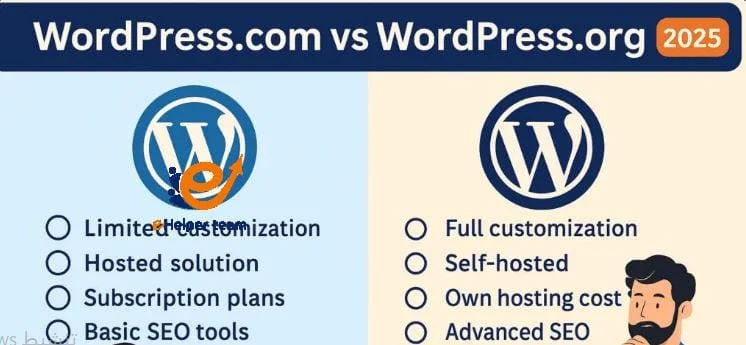
| Feature | WordPress.com | WordPress.org |
|---|---|---|
| Hosting | Managed automatically | You choose your hosting |
| Customization | Limited | Full access and control |
| Monetization | Restricted | Unlimited potential |
| SEO Options | Basic | Advanced with plugins |
| Maintenance | Platform-handled | User-controlled |
| Scalability | Fixed plans | Unlimited growth |
| Ideal For | Beginners, casual users | Professionals, businesses |
Choose WordPress.com if:
You want a quick, maintenance-free setup.
You don’t need deep customization.
You prefer convenience over flexibility.
Choose WordPress.org if:
You want full control and ownership.
You plan to monetize or grow your website.
You’re serious about SEO, branding, and scalability.
For long-term results, WordPress.com and WordPress.org remain the most powerful and flexible platforms for 2025 and beyond.
Frequently Asked Questions (FAQs)
1. Can I move from WordPress.com to WordPress.org?
Yes, migration is simple using built-in tools or plugins. You can transfer all your content and keep your SEO intact with modern migration methods.
2. Is WordPress.org really free?
Yes, the WordPress software is free, but you’ll pay for hosting and a domain name.
3. Which one is better for SEO?
WordPress.org wins, as it allows advanced plugins and optimization techniques that WordPress.com restricts.
4. Can I earn money with WordPress.com?
Only with paid plans. Free users can’t run their own ads or affiliate links.
5. Is WordPress.org harder to maintain?
Slightly, but modern automation plugins make it simple to manage updates and backups.
6. Which platform is more secure?
Both are secure, but WordPress.org gives you more control to customize and enhance your security setup.
7. Can I build an online store on both?
Yes, but it’s much easier and more flexible on WordPress.org using WooCommerce.
8. Does WordPress.org provide customer support?
There’s no official live support, but forums and tutorials are widely available.
9. Can I use plugins on WordPress.com?
Only on premium plans. WordPress.org allows any plugin you choose.
10. Which one is best for professionals in 2025?
For growth, branding, and total control, WordPress.org remains the best option.
Conclusion
In 2025, the difference between WordPress.com and WordPress.org is clearer than ever. While WordPress.com provides simplicity and automatic maintenance, WordPress.org empowers you with full control, flexibility, and long-term scalability.
For creators, entrepreneurs, and businesses seeking true digital independence, WordPress.org stands out as the smarter and more strategic choice.
With complete ownership, unlimited customization, and full monetization potential, it’s the foundation for building powerful, future-proof websites that grow alongside your goals.